What does the breaking news cycle look like today on the multiple platforms where it's published? And how might it look in the future--if we move onto an all-digital platform?
A smart analysis from Lauren Rabaino of the confusing, and often dead-end, threads that now greet readers trying to follow a story as it develops: http://www.mediabistro.com/10000words/the-new-convoluted-life-cycle-of-a-newspaper-story_b8552.
How could the publishing platform(s) be improved?
11.19.2011

11.18.2011
Strong and Not-so-Strong Headlines
Class, a reminder to please post a comment to this thread before the next class on good and bad headlines. Here are the instructions from your class schedule:
Please find a good and not-so-adept headline on one or more news Web sites, and explain why you think so. Please be sure to give the full URL and headline for each. Include a sentence or two of constructive comments. Please be sure your criticism is tactful: Our class blog is online for the world to see (although only the class can comment to it.) Please don't write anything you'd be embarrassed by if strangers see.
To refresh your memory on what makes a good and bad headline, please read the headline area of this Web writing handout: http://www.newsline.umd.edu/italy/writing.htm
And please review the headline sections of this handout: http://multimedia.journalism.berkeley.edu/tutorials/seo-search-engine-optimization-basics/seo-newsroom/
Please find a good and not-so-adept headline on one or more news Web sites, and explain why you think so. Please be sure to give the full URL and headline for each. Include a sentence or two of constructive comments. Please be sure your criticism is tactful: Our class blog is online for the world to see (although only the class can comment to it.) Please don't write anything you'd be embarrassed by if strangers see.
To refresh your memory on what makes a good and bad headline, please read the headline area of this Web writing handout: http://www.newsline.umd.edu/italy/writing.htm
And please review the headline sections of this handout: http://multimedia.journalism.berkeley.edu/tutorials/seo-search-engine-optimization-basics/seo-newsroom/
11.13.2011
A Must-Read on Aggregation
Jack Shafer writes a thoughtful piece about best practices for aggregation, while offering a defense for Jim Romenesko, who stepped down after a dozen years from his post at Poynter.
11.11.2011
On becoming a student entrepreneur
Amy Reinink, who is an SPJ-DC member and friend, just wrote a great piece for the Washington Post Magazine on college students who are either skipping college to become entrepreneurs or graduating from school as their own boss. While the University of Maryland probably does not want us to skip out on our graduate studies, there are some valuable lessons from this story that I think our professors would urge us to use and apply. I think that to a large extent, digital and online media give us an opportunity as journalists to think in new and exciting ways.
Read the article:
http://www.washingtonpost.com/lifestyle/magazine/student-entrepreneurship-in-college-is-on-the-rise-in-poor-economy/2011/10
Listen to the NPR interview:
http://www.npr.org/player/v2/mediaPlayer.html?action=1&t=1&islist=false&id=142211120&m=142211111
Read the article:
http://www.washingtonpost.com/lifestyle/magazine/student-entrepreneurship-in-college-is-on-the-rise-in-poor-economy/2011/10
Listen to the NPR interview:
http://www.npr.org/player/v2/mediaPlayer.html?action=1&t=1&islist=false&id=142211120&m=142211111
11.09.2011
Join us to discuss media diversity in Brazil, South Africa, US with 3 guest speakers
 I thought you might be interested in a seminar a colleague and I are moderating this Friday at 1.30pm. Paulo Rogerio is from Brazil, and he will be talking about media diversity in Brazil and I will be giving the perspective from South Africa. There will also be three guest speakers from leading agencies in the U.S.
11.04.2011
" Why Johnny Can't Search"
This the title of an article in this months edition of " Wired." I think it sums up quite succinctly the reason why we as journalists need to be highly suspect of Internet search results. As the article by clive@clivethompson.net points out, " kids know how to Google- they just can't tell when the results are crap." (pg.062)
In his piece Thompson cites a study done by College of Charleston business professor Bing Pan. Pan and his team gathered a group of students and asked them to search. Not surprisingly students often relied on top results on a Google page. He then switched around the order of the results and students still used the top rated results. And in almost every case the students, most of whom are " digital natives", failed to do the most basic things, like checking an authors credentials or examining where the item came from.
The bottom line of the piece is students aren't being given the most basic instruction on how to separate the " wheat from the chaff" on the Internet.The article suggests by the time students are in college most professors expect them to know this, but why? Its not as though this is a skill that's taught in most schools. And the article goes on to say it's not just the URL but also the tone of the piece that should be looked at.
Not unlike what we were asked to do on our recent mid-term. In the world of online reporting perhaps " crap detection" is one of the most important skills we can have.
The author notes that's especially true at a time that the lines between news and infotainment are becoming quite blurred.
In his piece Thompson cites a study done by College of Charleston business professor Bing Pan. Pan and his team gathered a group of students and asked them to search. Not surprisingly students often relied on top results on a Google page. He then switched around the order of the results and students still used the top rated results. And in almost every case the students, most of whom are " digital natives", failed to do the most basic things, like checking an authors credentials or examining where the item came from.
The bottom line of the piece is students aren't being given the most basic instruction on how to separate the " wheat from the chaff" on the Internet.The article suggests by the time students are in college most professors expect them to know this, but why? Its not as though this is a skill that's taught in most schools. And the article goes on to say it's not just the URL but also the tone of the piece that should be looked at.
Not unlike what we were asked to do on our recent mid-term. In the world of online reporting perhaps " crap detection" is one of the most important skills we can have.
The author notes that's especially true at a time that the lines between news and infotainment are becoming quite blurred.
11.03.2011

11.01.2011
Twitter, Facebook to star in 2012 election
 I was referred to this survey, conducted by Digitas and Harris Interactive, by this story. There I was, reading through it, when I hit paragraph two, which said that :
"A recent survey of adults found that a majority of respondents — 61 percent – said they expect candidates in the 2012 U.S. presidential election to have a social media presence. And 38 percent of respondents in the survey, which polled adults on behalf of brand agency Digitas, said that information found on social media sites such as Twitter and Facebook will help determine their voting choices just as much as TV or newspapers."
Well, no. That's not what the survey says. Look in the box on the top left of the graphic. It says that six out of 10 social media users think presidential candidates should increase their presence on things like Twitter and Facebook. The box next to it says that 82 percent of American grown-ups use social media. If you do the math, we end up with 50 percent of the population saying they want presidential hopefuls to up their presence on social media. That's still a sizeable percentage and number, but it's also wrong to say that six in 10 Americans think a presence on Twitter and Facebook are key to how they'll vote next year.
Who does it surprise to learn that social media users think the next president should use social media? Not me. I mean, look at the role that Twitter and Facebook played in the Arab Spring uprisings, that social media is playing in Syria, and that it played in President Obama's successful election campaign in 2008.
The real news in this survey was spotted by Matt Carmichael, who wrote about it on the AdAgeStat blog.
"Perhaps the surprising thing... is the stat that 40% of social-media users don't expect candidates to have a social-media presence."
Carmichael goes on to say that the politician who does not use social media is as backwards as -- and he lets us fill in the blanks. Maybe he's too young to remember the rotary phone and the time when party lines had nothing to do with how politicos voted but referred to someone you shared a phone line with, but that would be a good one to fill in the blanks with.
In any case, I found the original story to be a good example of why you should always go back to the original source of a story to double-check facts. In this case, that meant going back to the survey.
I am not saying that Twitter and Facebook are not key tools that candidates for the White House have to master. They are. As Digitas senior vice president Jordan Bitterman, who is also the agency's social marketing practice director (that has to be in the running for job title of the year), said in a release posted on PR Newswire:
"JFK is considered the first television President. Next year's victor may well be determined by the impact of Facebook and Twitter."
10.30.2011
Will there be a future for social media editors?
I attended the Journalism Interactive conference on Friday, and I really enjoyed the Friday morning session on journalism and social media use. New York Times social media editor, Liz Heron was on the panel and said that she thought her job might not be around in five years. You can see more of what she said here: http://www.niemanlab.org/2011/10/heron-i-think-my-job-will-probably-not-exist-in-five-years/ (source: Nieman Lab).
I thought it was a pretty bold statement, given that many journalists still do not use social media or are hesitant to sign-up. What do you think? Given that there is a heightened focus on social media, will jobs like Heron's still be around in five years? Or do you think there will always be a need for a social media editors within the newsroom?
I thought it was a pretty bold statement, given that many journalists still do not use social media or are hesitant to sign-up. What do you think? Given that there is a heightened focus on social media, will jobs like Heron's still be around in five years? Or do you think there will always be a need for a social media editors within the newsroom?
10.29.2011
Introducing Visual.ly
Hello Everyone,
I came across Visual.ly - a new infographics start-up - a few weeks ago and since I wanted to share it with you. This video tells who they are and what they do very effectively. It's just another source that shows the power of infographics and data visualizations today.
This one was one of my favorites.
I came across Visual.ly - a new infographics start-up - a few weeks ago and since I wanted to share it with you. This video tells who they are and what they do very effectively. It's just another source that shows the power of infographics and data visualizations today.
This one was one of my favorites.


10.25.2011

10.24.2011
It's Never Too Late
It is my belief that learning is life-long. Just consider how quickly technology changes from year to year. For this reason, and many others, more and more "older" students are returning to the classroom. Take a look at this clip.
58-Year-Old Proves It's Never Too late, by Post University
58-Year-Old Proves It's Never Too late, by Post University
10.21.2011
Oh well... too late now
This is especially for Kathy, Jack and me. Here's how it starts: "Let’s say you’ve been a journalist for a while but you feel a bit out of the loop when it comes to using social media and multimedia... Should you go to grad school?
'Lord, no,' says Jen Lee Reeves of KOMU-TV, who’s on the faculty at the University of Missouri. 'You can teach yourself anything. You just need a little quiet time.'"
Aye, and there's the rub. Where do you find 'quiet time'?
You can read the whole story here. If you have trouble following all of the logic in it, please let me know.
'Lord, no,' says Jen Lee Reeves of KOMU-TV, who’s on the faculty at the University of Missouri. 'You can teach yourself anything. You just need a little quiet time.'"
Aye, and there's the rub. Where do you find 'quiet time'?
You can read the whole story here. If you have trouble following all of the logic in it, please let me know.
The dangers of tweeting
A few high profile slip-ups on Twitter illustrate why we have to think twice before cooing or clucking on the 140-character communication medium. In defense of the French minister, he was sending a message to his wife. He just messed up and, instead of pushing just her buttons, pushed one that tweeted the message to her and 14,000 followers.
10.17.2011
10.11.2011
Using Augmented Reality Animation to Make Sense of the World
When I first learned about Hans Rosling and saw several of his presentations, I realized the strong bond between the editorial and the “interactively technical.” More than ever before. In the industry that uses vast amount of public data to provide context and explain larger socio-economic, political and medical developments, it is becoming increasingly important to present that data in a way anyone, anywhere, anytime could understand.
Rosling has pioneered an “out of the box” creative phenomenon of explaining data using augmented reality animations - so that we can make sense of the world. The software the Gapminder team developed – Trendalyzer – turned numbers into a meaningful, enjoyable, animated and interactive graphics. Even Google liked it. It bought the software and hired Gapminder developers in 2007.
The BBC documented Rosling’s love for the statistics in an hour-long program The Joy of Stats in which Rosling proved that statistics could be fun too.
This section of the BBC program particularly demonstrates Rosling’s creative approach of understanding data. In four minutes, Rosling tells the world story in 200 countries over 200 years by using 120,000 numbers.
For those of us who end up covering business or medical beat or any other beat that uses an excessive amount of numbers to explain concepts, hopefully Rosling would inspire you to think outside of the box when using new tools to make sense of the world. Enjoy!
10.10.2011
Adapting in the News Business
After our discussions about the pressures journalists are under for deadlines and my research over the past week about my newspaper that I'm following, the Los Angeles Times, I thought that this article was especially relevant about the decline in newspapers and the shift to a need for multi-platform journalism. This article by the AJR is rather large, but it sum it up, it really gets into the pressures that the newspaper business and publications as a whole are under as well as just individual reporters. When I was researching the Los Angeles Times, there were article by other publications that talked about how the circulation has been down in numbers over the past few years. Newspapers were traditionally just for print, but with new websites, this basically requires them to step up their game and add more multimedia elements. I think that it's interesting because, now, it seems like it's more important to have multiple elements for each story and continue updating it on the web as soon as new information comes in. Reporters are under pressure to report quickly but so are newspapers in general in order to survive.
Post up your links in the comments area of this post
Class, please post your About, Resume and Blog links in the comments area of this post. Thanks!
10.04.2011
For social-networking job-seekers
I include myself in that number. Here's a cautionary tale that you probably knew about already anyway.
Huffington Post's latest acquisition
An interesting story in the Boston Globe. Maybe we should launch a start-up and create our own jobs.
9.29.2011
9.28.2011
Deadline for Resume Pushed Back One Week to Oct. 10
Class, just wanted to underscore what I said verbally in class on Monday: I'm pushing back the deadline on the Wordpress resume by one week -- so that we can do a bit more work in class next week with your Wordpress sites before the resume is due. That means now that both the resume and the first blog post will be due on Oct. 10.
The first blog post -- and the other nine -- will be analyses of the professional site you chose at the start of class. Here is the question to answer for blog 1, due Oct. 10: Introduce us to this site: Its history, audience, ownership, mission and staff. Has it radically changed direction (in content, staffing or business plans) in recent years? Please consult previously written stories and site "about us" or media kit pages, and link and attribute information appropriately.
If you get your resume copyediting tweaks done before next week, we may be able to start it on Wordpress in class.
Best, Chris Harvey
The first blog post -- and the other nine -- will be analyses of the professional site you chose at the start of class. Here is the question to answer for blog 1, due Oct. 10: Introduce us to this site: Its history, audience, ownership, mission and staff. Has it radically changed direction (in content, staffing or business plans) in recent years? Please consult previously written stories and site "about us" or media kit pages, and link and attribute information appropriately.
If you get your resume copyediting tweaks done before next week, we may be able to start it on Wordpress in class.
Best, Chris Harvey
9.25.2011
Launching Your Hosting and Your Wordpress Platform
This picks up from the previous post:
STEP 2: Launching Hosting:
Go to manage/hosting/launch
Enter domain:
Enter Password:
You will get an email when this step is complete.
STEP 3: Launch Wordpress (from the Wordpress site):
* Log in to your Account Manager.
* From the Products section, click Hosting.
* Next to the hosting account you want to use, click Launch.
* Complete the following fields, and then click Finish:
* Enter domain — Enter the domain name you want to use.
* FTP user name — Use the automatically generated user name.
* Password & Confirm password — Enter the password you want to use to access your hosting account with FTP.
* Enter your email address.
* Blog title — Enter the title you want to use.
The estimated wait time for your hosting account to become accessible displays. When your account is set up, the Wordpress team will email you all of your basic account-management information.
To set up your pages, go to your domainname/wordpress
Then log in with user name and password.
Or click on “Your Applications” from the hosting control center, then “My Applications.”
STEP 2: Launching Hosting:
Go to manage/hosting/launch
Enter domain:
Enter Password:
You will get an email when this step is complete.
STEP 3: Launch Wordpress (from the Wordpress site):
* Log in to your Account Manager.
* From the Products section, click Hosting.
* Next to the hosting account you want to use, click Launch.
* Complete the following fields, and then click Finish:
* Enter domain — Enter the domain name you want to use.
* FTP user name — Use the automatically generated user name.
* Password & Confirm password — Enter the password you want to use to access your hosting account with FTP.
* Enter your email address.
* Blog title — Enter the title you want to use.
The estimated wait time for your hosting account to become accessible displays. When your account is set up, the Wordpress team will email you all of your basic account-management information.
To set up your pages, go to your domainname/wordpress
Then log in with user name and password.
Or click on “Your Applications” from the hosting control center, then “My Applications.”
9.24.2011
Buying a Web Hosting Account with godaddy.com
For those of you in class who have not yet taken the first steps for buying a Web hosting account through godaddy.com, please spend about 45 minutes this weekend following the steps below to set up the framework for your godaddy/Wordpress account. This way we'll all be starting from the same approximate point on Monday morning:
When done, you may click on Go Directly to My Account to get to your account manager.
We'll pick up at this step on Monday.
- Search for promo codes (coupons) for godaddy on the Internet: I found gdz952z for a 30 percent discount at checkout. Feel free to use that code, or another you find, at checkout.
- Go to godaddy.com in your browser: Do a domain name search to see if the combination you want for your Web site address is available. I bought chrisharvey.info for $1.99 for the year. You might also check out .com, .org, .me or us. If you click on the code on the selection page, it will explain each domain name.
- Complete the Domain Registration Information. IMPORTANT: I used a work address and phone number, because this information will show up on the WHOIS listing, which is public information. I used a work email and left the company box blank. See more info on privacy two bullets down.
- I registered for 1 year, and clicked “unCertified” Domain. (Godaddy charges $4.99 a year to assure consumers you are who you purport to be. You can choose to pay this extra fee if you'd like.)
- Privacy and Domain Protection: If you don’t have a work address, you may have to pay between $11.99 and $24.99 for varying levels of privacy protection on step 3 of the registration process. PLEASE NOTE THAT YOU’RE ALSO ASKED AT CHECKOUT IF YOU’D LIKE A PRIVATE REGISTRATION; AT THIS STEP, YOU CAN BUY IT FOR $6.99 A YEAR. It also asks you at checkout if you’d like to buy .mobi (a mobile account) for $6.99 a year for those interested. I did not do this.
- Choose hosting type. I chose Economy, for 10 gig of space, at $5.19 a month. It unfortunately at this step doesn't ask you for how long; it assumes a year. This can be changed at checkout to shorter periods. You'll see in steps to come.
- At CHECKOUT, be sure to enter your promo code, gdz952z (or another you've found). If this doesn’t work for you, simply search for another coupon on the Internet. Search for godaddy.com promo codes.
- Check your address and password info. I left off my home phone number.
- Be sure to jot down your login info and keep it in a safe place!
- While checking over your info in your cart, you can change your hosting term from 1 year to monthly (3 months or 6 months, for instance), if you'd like to shorten. Click on hosting in the green navigation bar, add 3 months or 6 months of hosting, and then click on your shopping cart to delete the longer option you initially started with (for one year). This cut my order price in half – from about $44 to $26 -- when I chose 6 months.
- Type in your credit card info, click on the terms of agreement, and order.
When done, you may click on Go Directly to My Account to get to your account manager.
We'll pick up at this step on Monday.
9.19.2011
8.16.2011
Welcome Fall Class!
I'm looking forward to engaging with you electronically as well as verbally in class. Please use this class blog to post thoughtful comments on new-media topics in the news. Please attribute your information, and provide links to sources.
You're required to start at least one discussion thread on this blog, as well as to comment on others' posts.
Posts to this blog are in addition to those you will be writing on your personal Wordpress blogs, created in class.
You're required to start at least one discussion thread on this blog, as well as to comment on others' posts.
Posts to this blog are in addition to those you will be writing on your personal Wordpress blogs, created in class.
5.12.2010
Google map tip
Since a few people in class seemed to have trouble altering the coding on their Google maps so they displayed with the correct amount of zoom, I thought it would be helpful to explain what I did. I had to adjust mine several times before I figured it out, and it was pretty much the only time I ever felt like a computer genius, so here goes:
After you create your map, click on the 'link' button in the upper right corner:
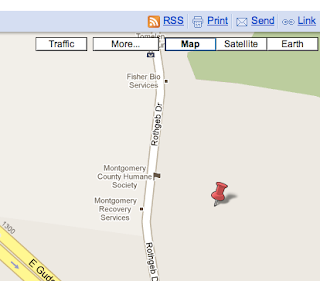
Then, in the box that pops up, click 'customize and preview embedded map.'

A screen will appear where you can change the size and orientation of your map, and you'll notice that the coding in the box corrects itself whenever you make a change. This lets you zoom out on your map to show all your pinpoints (if you have a large area), or zoom in to show individual streets (if you have a small area).
I think Google maps can be a useful tool when writing for the Web. Since so many people already use it, readers won't feel uncomfortable with the technology. The interactive element also makes it especially good for Web writing, because it allows the reader to use the tool, rather than just look at it. Newspapers and magazines can have some well-constructed infographics, but many of these would not stand up to the Web.
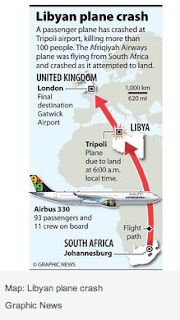
For example, this infographic from the Christian Science Monitor story about the Libyan plane crash has a map and an illustration of the plane, all in one small space. The reader gets a lot of information, and the publication doesn't have to worry about taking up precious real estate in the ever-shrinking news hole. However, if they were to put this on the Web, there would need to be some sort of interactive element to draw in the reader.
My only problem with Google maps is that it can sometimes seem a little boring and pedestrian. Has anyone ever used any other programs to create maps or infographics for the Web?
5.11.2010
Using Flash on Websites
When I think about fancy graphics being used on websites, I always assume they are using Abobe Flash. Anytime your computer doesn't have the latest Flash update, suddenly every page on the Web becomes inaccessible because you have to upgrade your Flash player. That's why I was really surprised when I found this article on The Online Journalism Review about whether or not web designers should continue using Flash on their websites. I assumed Flash was the standard.
It was interesting to learn from this article that the reason that Flash is beginning to get phased out is because mobile devices don't support Flash. Apparently the IPhone has never been able to run Flash because Adobe and Apple are in a disagreement and if you try to download Flash on a Droid, you just get a message that says in the first half of 2010, Flash will become available for the Droid. I hadn't realized that this was such an issue, but then when trying to browse the web from my phone I discovered how many websites I couldn't use because I didn't have Flash. With the huge expansion of people accessing the Web from their phones, this has to be a concern for web designers that millions of people can't use their sites and are going to go elsewhere for their news.
The author of the OJR article says that he is beginning to shift away from Flash to alternative design methods because he personally doesn't want to lose such a large percent of his readers. I think this is a really interesting issue that is going to move into the spotlight as more people begin to browse the Web on mobile devices and become more annoyed at the handicap they have because they can't look at sites that use Flash. On the other end, Adobe should be getting worried because companies are going to start moving away from Flash if it means allowing the mobile audience to view their sites.
It was interesting to learn from this article that the reason that Flash is beginning to get phased out is because mobile devices don't support Flash. Apparently the IPhone has never been able to run Flash because Adobe and Apple are in a disagreement and if you try to download Flash on a Droid, you just get a message that says in the first half of 2010, Flash will become available for the Droid. I hadn't realized that this was such an issue, but then when trying to browse the web from my phone I discovered how many websites I couldn't use because I didn't have Flash. With the huge expansion of people accessing the Web from their phones, this has to be a concern for web designers that millions of people can't use their sites and are going to go elsewhere for their news.
The author of the OJR article says that he is beginning to shift away from Flash to alternative design methods because he personally doesn't want to lose such a large percent of his readers. I think this is a really interesting issue that is going to move into the spotlight as more people begin to browse the Web on mobile devices and become more annoyed at the handicap they have because they can't look at sites that use Flash. On the other end, Adobe should be getting worried because companies are going to start moving away from Flash if it means allowing the mobile audience to view their sites.
Subscribe to:
Posts (Atom)


 Posts
Posts


